
Help center/Set up/Integrations
Send Paidnice events to a webhook
Get a POST to your own URL when a reminder, late fee, SMS, statement or escalation event happens, and see what to do when deliveries fail.
Updated 5 November 2026
A webhook tells another system when something happens in Paidnice, for example to log every reminder in your CRM or to open a task when an escalation is raised. Paidnice sends a POST request with a JSON body to one URL that you choose. Webhooks need a Pro plan. On other plans the settings are visible but grayed out with an Upgrade badge. If your plan drops below Pro, webhooks are switched off.
For reading data from Paidnice instead, see Use the Paidnice public API.
Setting one up
Go to Organisation Settings, Advanced, Webhooks.
- Enter your address in Webhook URL. This is the web address where Paidnice will send webhook notifications.
- Under Events, tick the events you want. Every event is on until you switch it off. Click an event to see what it does, switch it with the Send toggle, and open Sample payload to see an example body.
- Save the settings.
The event list is grouped:
- Invoice actions: Reminder email, Late fee, Late fee email, SMS, Discount applied, Discount removed, Discount applied email, Discount removed email and Escalation.
- Nested under Escalation: Note added, Completed, Cancelled and Reopened. These fire when someone changes an escalation after it has been raised.
- Contact actions: Statement email, Statement interest, Statement interest email and Announcement email.
- Quotes & payment plans: Quote email and Payment plan reminder.
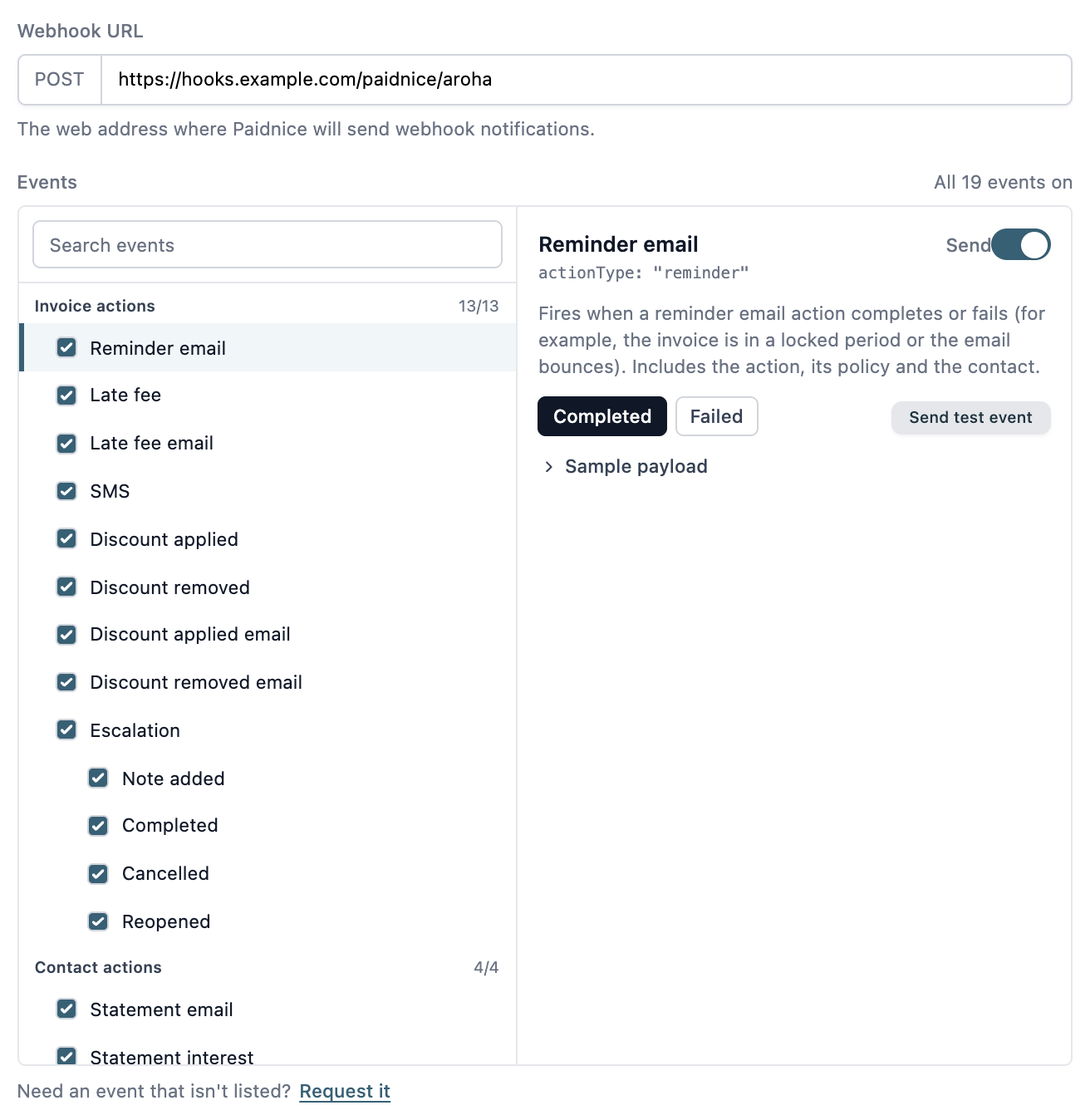
Each action event fires when that action completes or fails (for example, the invoice is in a locked period or the email bounces). Use the search box to find an event. If you need one that isn’t listed, Request it sends the request to Paidnice.
What the request contains
The body is JSON. Action events include the contact (name, address details, contact people, portal link), the policy that caused the action, the invoice when there is one (number, reference, due date, total, balance due, portal link and, on Xero, a link to the invoice), and the action itself: its ID, type, status, date, any notes and the error if it failed. SMS events also include the message sent. Escalation events include the escalation type, status, dates, and its notes.
Requests are not signed, so if you need to check where a request came from, keep the URL hard to guess. The sample payload for each event shows the exact fields.
Testing
Select an event, pick Completed or Failed (action events only) and click Send test event. Paidnice sends the sample payload to your saved URL and shows the response status. Test bodies include "test": true. Test sends are not stored in the request list and do not count towards the failure rules below. The button is disabled until you have saved the URL.
Checking what was sent
Recent Requests (Last 14 Days) lists each delivery with its time, the URL, and the response code (ERR when your server never answered). Click a row to see the body that was sent. A request that Paidnice retried is marked Retried and the newer attempt is marked Retry.
The arrow on the latest attempt resends it to your current URL. If any deliveries failed, Retry N failed webhooks resends the latest attempt of each one.
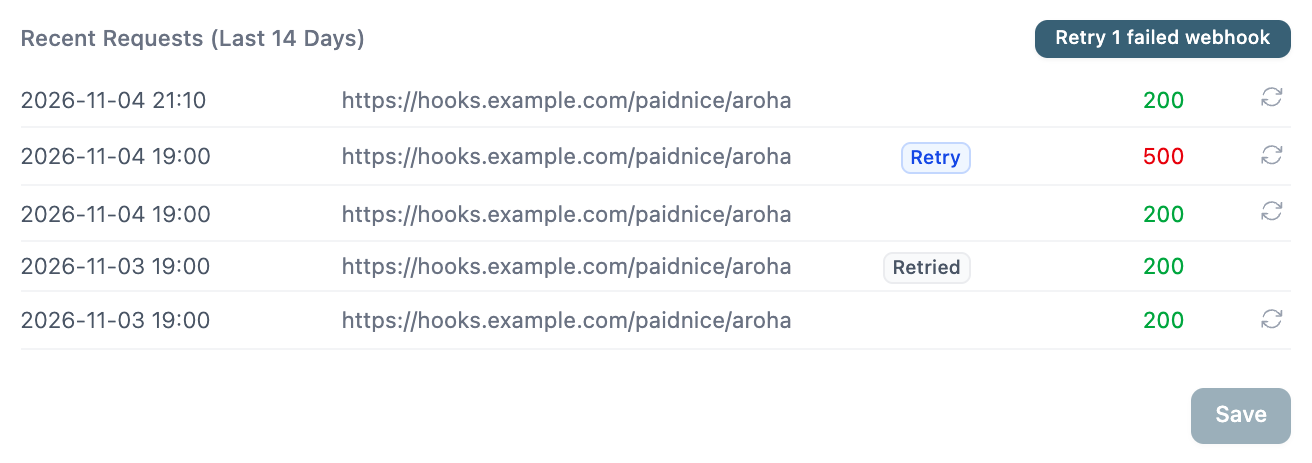
When deliveries fail
A response outside the 200s, or no response, counts as a failure. Paidnice tries again straight away and, if that fails too, records it.
- The first failure starts a failing period and emails the connected users on the organization (not invited users).
- While the period is open, Paidnice retries the latest failed delivery once a day. One successful delivery ends the period.
- If deliveries keep failing for 7 days, the webhook is switched off and those users get a second email. A warning on the Webhooks tab says “Your webhook has been disabled”.
To turn it back on, enter a new Webhook URL and save. That clears the failure state. Events that happen while the webhook is off are not sent afterward, but deliveries that failed earlier can still be resent from Recent Requests.
Turning webhooks off for one policy
On a policy, Disable Webhooks (under the advanced fields, Pro only) stops that policy’s actions from reaching your URL. SMS policies also have Only trigger webhook, which skips sending to the customer and only fires the webhook. These policies show a Webhook Only badge in the group, and the action says it only triggered a webhook.