
Help centre/Set up/Integrations
Use the Paidnice public API
Create an API token, read invoices, contacts and notes over REST, and see every request in the log.
Updated 29 October 2026
The public API lets your own systems read what Paidnice knows about your receivables: contacts, invoices, notes and inbound messages, plus a summary of what is outstanding. It is a REST API with JSON responses. The full reference, with every field and example requests, is at docs.paidnice.com.
If you want an AI agent rather than your own code to use the data, see Connect an AI agent to Paidnice (MCP). Both share the same settings page and request log.
Before you start
The public API is enabled per organisation. If you cannot see API & MCP under Settings, General, Advanced, ask your Paidnice contact to enable it. A request to an organisation that does not have it returns a 403 with the message “The public API is not enabled for this organisation”.
You need editor access to settings to create or revoke tokens. See Users and access.
Creating a token
- Go to Settings, General, Advanced and open the API & MCP tab.
- Click Create new token.
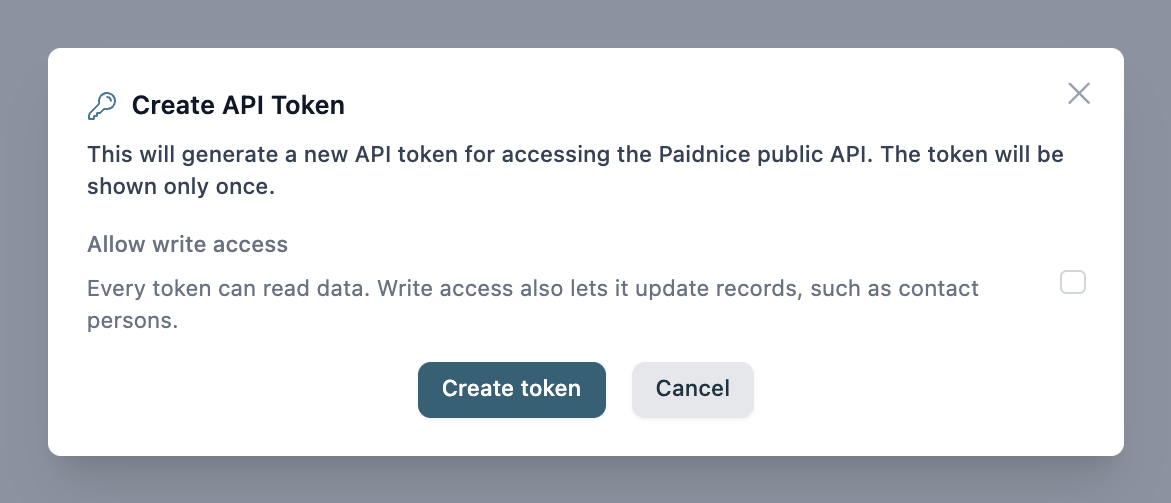
- Tick Allow write access if the token needs to change data. Every token can read. Write access also lets it update records, such as contact persons. Leave it off for reporting and dashboards.
- Click Create token.
- Copy the token straight away. It is shown only once, under the heading Copy your token now. If you lose it, revoke it and create another.
Tokens do not have names or expiry dates. The API Tokens table lists each one with Created, Created by and Access (Read only or Read and write). Click the bin icon to revoke a token. Revoking takes effect immediately.
Tokens are tied to the organisation you created them in. For several organisations, create a token in each.
Making requests
Send the token in the Authorization header as a bearer token:
curl https://rest.paidnice.com/rest/v1/organisation \
  -H "Authorization: Bearer pn_your_token_here"
Everything is under https://rest.paidnice.com/rest/v1. GET requests need read access. Anything else needs write access, and a read only token gets “This API token does not have the write scope”.
| Method and path | What it does |
|---|---|
| GET /organisation | The organisation’s details |
| GET /organisation/summary | Receivables totals |
| GET /contacts | List contacts |
| GET /contact/{id} | One contact |
| PUT /contact/{id}/contact-persons | Replace the contact’s list of people |
| GET /invoices | List invoices. Filter by contact, status (unpaid, overdue or paid) and due date range |
| GET /invoice/{id} | One invoice |
| GET /notes | Notes, filtered by contact or invoice |
| GET /inbound/sms and GET /inbound/email | Replies customers have sent |
Ids are Paidnice ids. Each record also carries the matching Xero or QuickBooks id. Amounts are decimals in the invoice currency and dates are ISO 8601.
List endpoints are paged with a cursor. Pass limit (1 to 100, default 10) and, for the next page, the nextCursor value from the previous response as cursor. The last page has no nextCursor.
Limits
Each token can make 120 requests a minute. Every response includes X-RateLimit-Limit, X-RateLimit-Remaining and X-RateLimit-Reset headers. Over the limit you get a 429 with a Retry-After header and the message “Too many requests. Try again later.”
A 401 with “Missing or invalid API key” means the token was revoked or mistyped.
The request log
Below the tokens, Request Log lists every public API request and MCP tool call from the last 90 days. Filter by token (All tokens) and by outcome (All results, Success or Error). Each row shows the Time, the Operation, the Token / app it came from and the Result code. Expand a row to see whether it was a REST request or an MCP tool call, how long it took and the IP address it came from. Click Load more for older entries.

Things to know
- The API is read only apart from contact persons. To be told when something happens, such as an escalation being raised, use webhooks under Settings, General, Advanced, Webhooks instead of polling.
- Tokens are not shared between organisations, and neither are their logs.
- Removing a user does not revoke the tokens they created. Revoke those by hand if you need to.