
Help centre/Get paid/Payment plan reminders
Set up payment plans for a group
Decide which invoices can be split into instalments, how many, how often, and whether to add a surcharge.
Updated 7 October 2026
Payment plans let an invoice be paid in instalments. Once a plan exists, every other invoice policy stops for that invoice and only payment plan reminders apply. Payment plans need a Pro plan.
Plans are configured per group, so you can offer them to some customers and not others.
Configuration
Open a group and find Payment Plan Configurations. Create a configuration and set:
- Enabled: turn the configuration on or off without deleting it.
- Split invoices into a maximum of: the most instalments a plan can have.
- Frequency: weekly, fortnightly, monthly or quarterly.
- Allowed First Payment Dates: which starting points are offered. Start today, on the invoice due date, or after one interval.
- Surcharge: optional. A percentage of the invoice total or a fixed amount, added to the invoice as a line when the plan is created. Pick the revenue account it is coded to.
- Filters: minimum and maximum days overdue, and include or exclude Xero branding themes. Use these to offer plans only on invoices that are already late, or only on certain invoice types.
Under Settings, Advanced you can also have Paidnice write a note to the invoice in your accounting system whenever a plan is created or removed.
Who can create a plan
- Your team, from the invoice page in Paidnice, using the group’s configuration as the starting point. Dates and amounts can be adjusted before the plan is created.
- The customer, from the invoice page in the portal, if the invoice qualifies under the group’s configuration. Under Other options they see Create a payment plan with “This invoice is eligible to be split into a payment plan”. The form asks how many payments to Split invoice into and the First payment due date, limited to what you allowed, then shows a Preview of the schedule before they confirm.
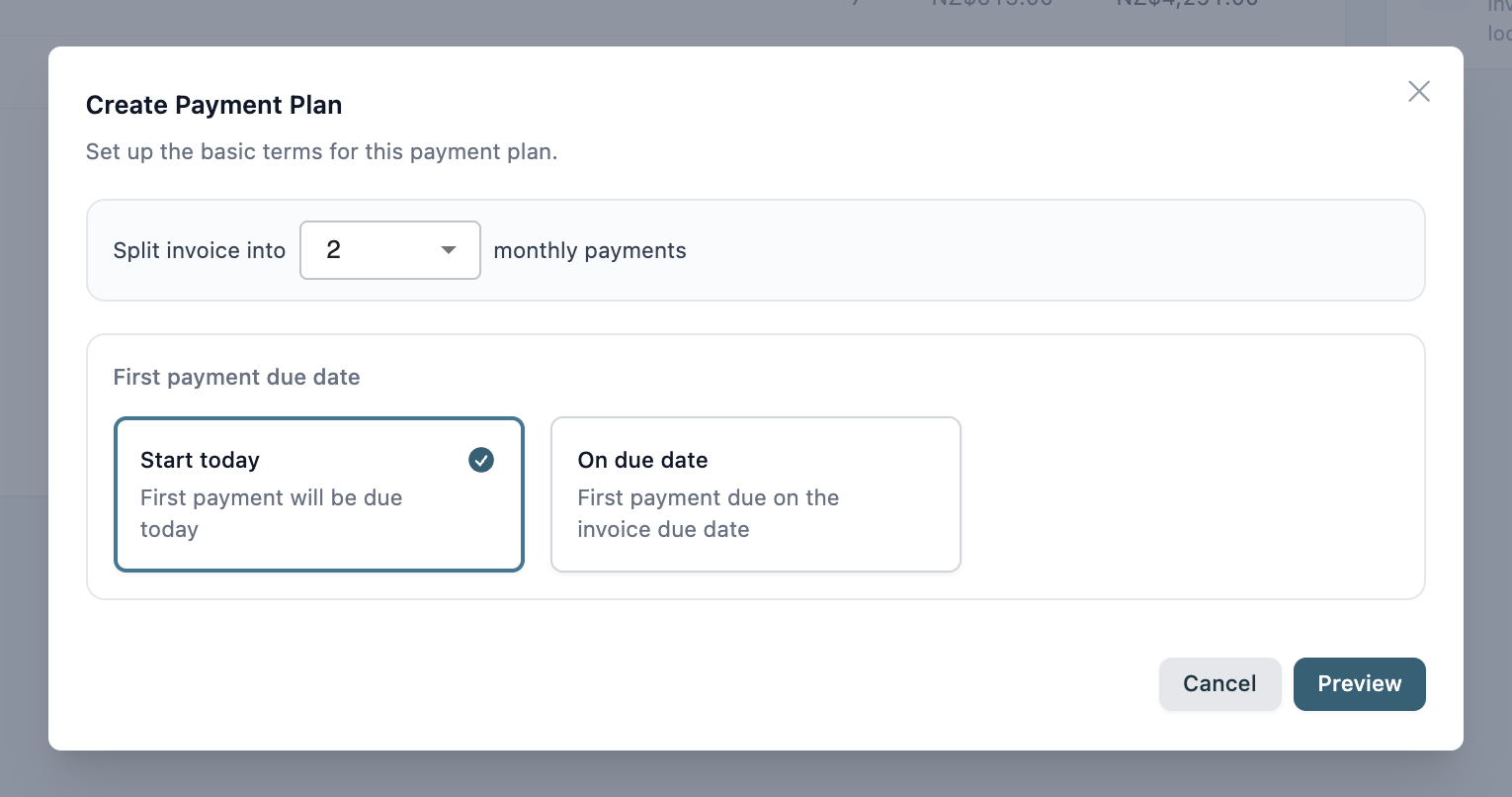
An invoice must be unpaid and approved, with no payments against it, and not already on a plan.
Reminders
Add a Payment Plan Reminder policy to the group so customers are reminded before each instalment. See How payment plan reminders work. To create or remove a plan on one invoice yourself, see Create or remove a payment plan on an invoice.
Paying instalments
With Stripe connected, the customer pays each instalment from the invoice page in the portal. See How payments work.