
Help centre/Customers and answers/Contacts
How contact credit scores work
A 0 to 100 score on each contact that sums up how they pay, what it is based on, and how to change the way it is worked out.
Updated 21 October 2026
Every contact gets a credit score from 0 to 100 based on how they have paid you in the past and where their account stands today. A high score means they pay on time and have little overdue. A low score means they pay late, or a lot of what they owe is overdue, or both.
The score only looks at your own invoices and payments in Paidnice. It is not a credit check and does not use any outside credit agency data.
Credit scores are switched on per organisation. If you cannot see them, ask support to enable the feature for your account.
Where to find it
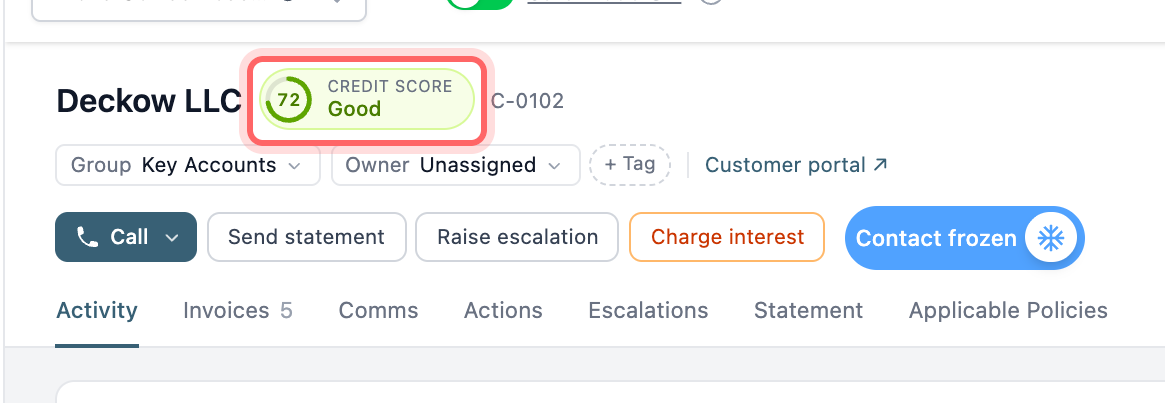
Contact page. The score sits in the contact header as a coloured ring with the band underneath, for example “Good”. Hover over it to see how many days late or early the contact pays on average. Click it to go to the credit score settings.
Escalations. The row of contact stats at the top of an escalation includes a Credit Score tile. Hover over it to see the average days late, how much of the outstanding balance is overdue, and the age of the oldest overdue invoice.
A contact with no payment history and nothing outstanding shows No data instead of a score.
Escalations are covered in How escalations work.
How the score is worked out
Every contact starts at 100 and loses points in three ways.
Paying late. Paidnice looks at every payment the contact has made against an invoice and how many days after the due date it landed. It then takes an average, where bigger payments count for more and recent payments count for more than old ones. A payment made six months ago counts half as much as one made today. Up to 65 points come off, scaling evenly until the average reaches 60 days late. Paying early pulls the average down but cannot push the score above 100.
Overdue share. Up to 20 points come off depending on how much of the contact’s outstanding balance is overdue. If half of what they owe is overdue, they lose 10 points. If all of it is overdue, they lose 20.
Age of the oldest overdue invoice. Up to 15 points come off depending on how long the oldest overdue invoice has been overdue, scaling evenly up to 90 days.
The last two only apply while the contact owes you money. Once everything is paid, the score is based on payment timing alone.
Part payments count individually, so a contact who pays an invoice in three instalments has three payments in the average. Deleted payments are ignored. Amounts are converted to your base currency, so contacts invoiced in more than one currency are weighed fairly.
Bands
The score is grouped into a band, shown as a label next to the number.
| Score | Band |
|---|---|
| 80 to 100 | Excellent |
| 60 to 79 | Good |
| 40 to 59 | Fair |
| 20 to 39 | Poor |
| 0 to 19 | High risk |
Examples
With the default settings:
- A contact who pays 5 days early on average and owes nothing scores 100 (Excellent).
- A contact who pays 15 days late on average, with $200 of a $1,000 balance overdue by 10 days, scores 78 (Good).
- A contact who pays 45 days late on average, with everything they owe overdue by 120 days, scores 16 (High risk).
When the score updates
The score updates when invoices and payments sync from Xero or QuickBooks, and again overnight. The overnight run also catches invoices that have simply become more overdue since the last sync.
Changing how the score is calculated
Go to Settings, General, Advanced, Credit Score. You can also get there by clicking the score on any contact page.
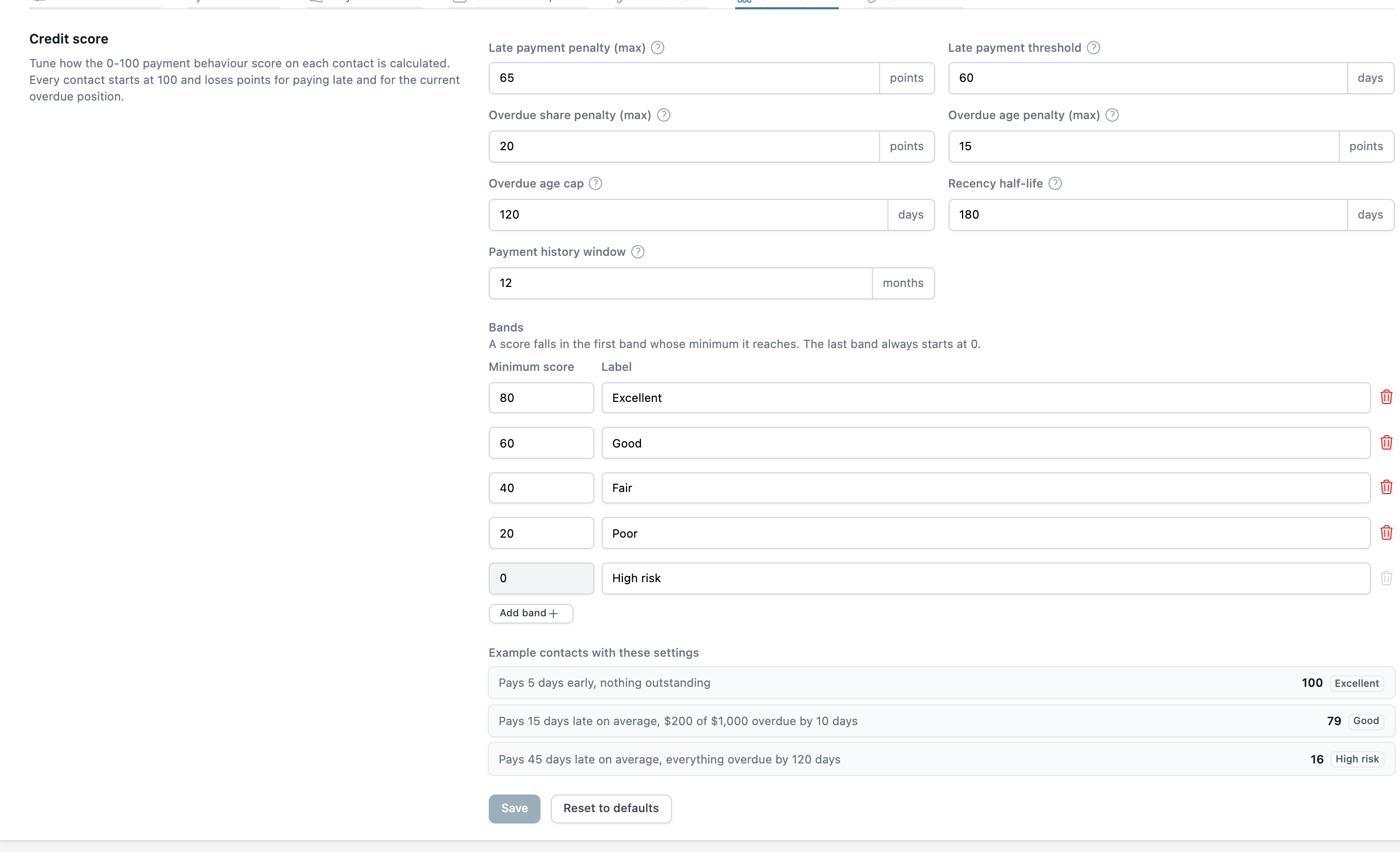
The settings are:
- Late payment penalty (max). The most points a contact can lose for paying late. Default 65.
- Late payment threshold. The average days late at which the full late payment penalty applies. Default 60 days.
- Overdue share penalty (max). The points lost when everything outstanding is overdue. Default 20.
- Overdue age penalty (max). The points lost when the oldest overdue invoice reaches the age cap. Default 15.
- Overdue age cap. How overdue the oldest invoice has to be for the full overdue age penalty. Default 90 days.
- Recency half-life. A payment this many days old counts half as much as one made today. Default 180 days. Set it lower if recent behaviour matters more to you than long history.
- Payment history window. Only payments within this many months count. Leave it blank to use all history, which is the default.
Under Bands you can rename the bands, change where each one starts, and add or remove bands. You need between 2 and 8 bands, the minimums have to go down from top to bottom, and the last band always starts at 0.
Below the settings, Example contacts with these settings shows the score three sample contacts would get with the values you have entered, before you save. Use it to check a change does what you expect.
Click Save to apply your changes, or Reset to defaults to go back to the standard settings.
A low score is a prompt, not an action. To act on it, raise an escalation, move the contact to a stricter group, or freeze the contact while you sort things out.
Changes to the penalties, thresholds and bands apply straight away. Changes to the recency half-life or the payment history window mean every contact’s history has to be recalculated. Paidnice starts this as soon as you save and scores update over the next few minutes. If that does not start for any reason, the change is picked up in the overnight run.