
Help center/Set up/Configuring Paidnice
How the dashboard metrics work
What each figure on the dashboard means, how Paidnice works it out, and what the Slowest Payers and Oldest Invoices lists show.
Updated 5 November 2026
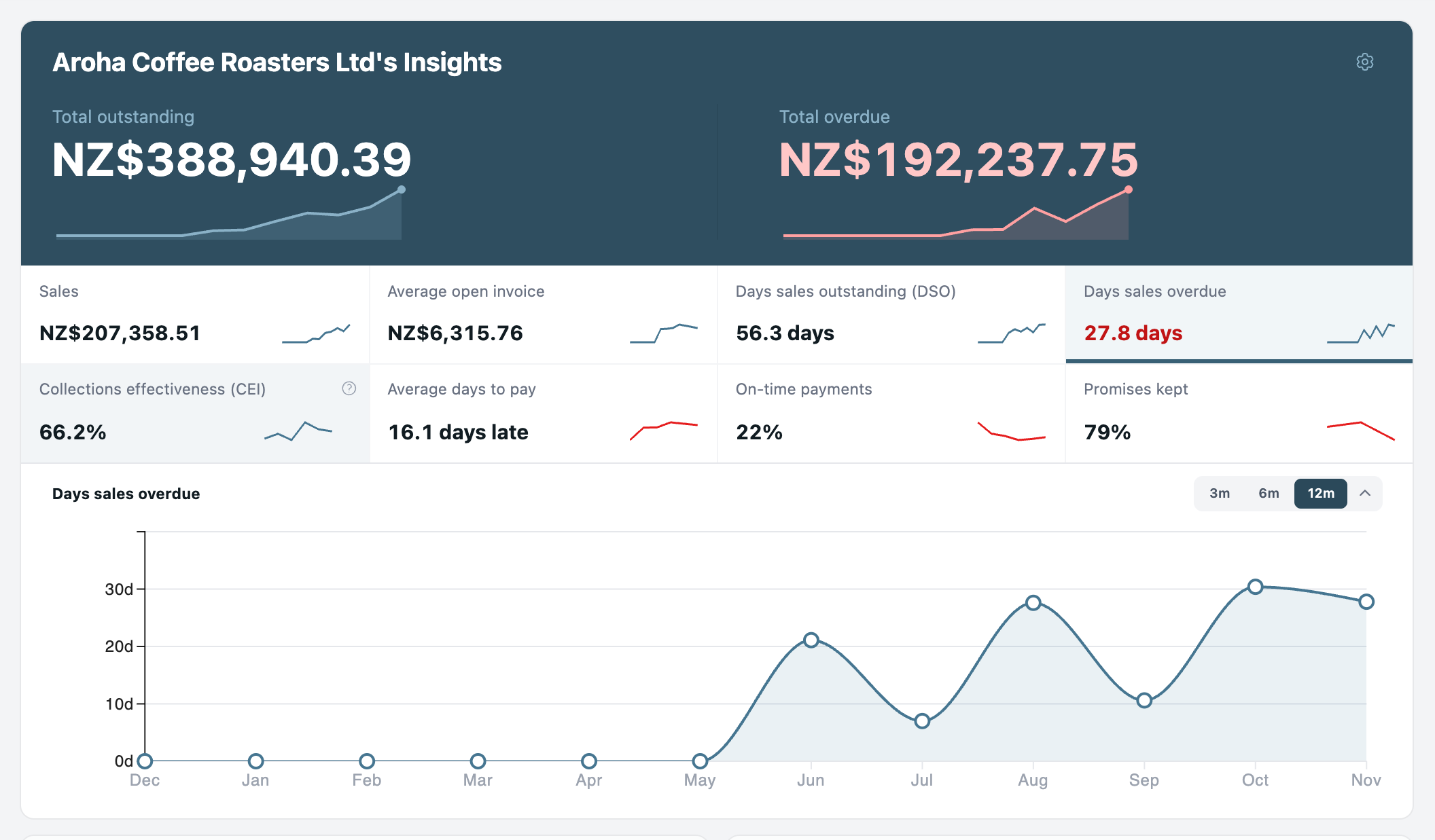
The dashboard opens with your organization’s Insights: what you are owed, how much of it is late, and how quickly customers pay. The figures are worked out live from the invoices and payments Paidnice has synced, so they can differ slightly from your accounting system’s reports. See Why a total differs from Xero or QuickBooks.
Currency and filters
Amounts are shown in one currency at a time. They are not converted. If you invoice in more than one currency, pick the currency from the dropdown next to the title. It starts on your base currency.
The cog at the top right opens Insight filters. Narrow the figures to one Assignee (or Unassigned), to contacts with certain Tags, or leave out groups and tags under Exclusions.
The same panel, without the filters, is on each group’s Insights tab and only counts that group’s customers.
Total outstanding and total overdue
- Total outstanding: the amount still due on every Approved invoice, including frozen invoices and invoices dated in the future. Drafts, voided and paid invoices are left out. If customers have unallocated credit, hover over the figure to see the total less that credit.
- Total overdue: the part of Total outstanding on invoices whose due date has passed. An invoice due today is not overdue yet.
Each has a small chart of the last 12 months and the change over that time.
The metric tiles
A tile is hidden when it has nothing to show, for example Sales in a month with no invoices.
- Sales: the total of invoices issued in the last 30 days, paid or not. Drafts and voided invoices don’t count.
- Average open invoice: the average total value of the invoices that are still open. It uses each invoice’s full total, not just what is left to pay.
- Days sales outstanding (DSO): how many days of sales are sitting unpaid. It is Total outstanding divided by your average daily sales, where average daily sales is Sales divided by 30. For example, NZ$60,000 outstanding with NZ$30,000 of sales in the last 30 days is NZ$1,000 a day, so DSO is 60 days. Lower is better.
- Days sales overdue: the same sum with Total overdue instead of Total outstanding, so it shows how many days of sales are late. It is not the average age of overdue invoices.
- Collections effectiveness (CEI): of everything that fell due in the last 90 days, the share you collected. Invoices that are not due yet don’t count against it. The ? next to it shows the formula. 100% means everything that fell due was paid.
- Average days to pay: for invoices fully paid in the last 90 days, the average number of days between the due date and the date it was fully paid. It reads On time, or a number of days late or early.
- On-time payments: the share of invoices fully paid in the last 90 days that were paid on or before their due date.
- Promises kept: the share of payment promises resolved in the last 90 days that were paid in time. It reads No promises when there are none.
Average days to pay and On-time payments count invoices in every currency, not just the one selected.
For a single customer’s payment record, see their credit score.
Monthly trends
Click Monthly trends under the tiles to open a chart, then click any tile, or either total, to chart it. Choose 3m, 6m or 12m at the top right. Each point is the figure as it stood at the end of that month. The chart stays open or closed the way you left it on that browser.
Slowest Payers and Oldest Invoices
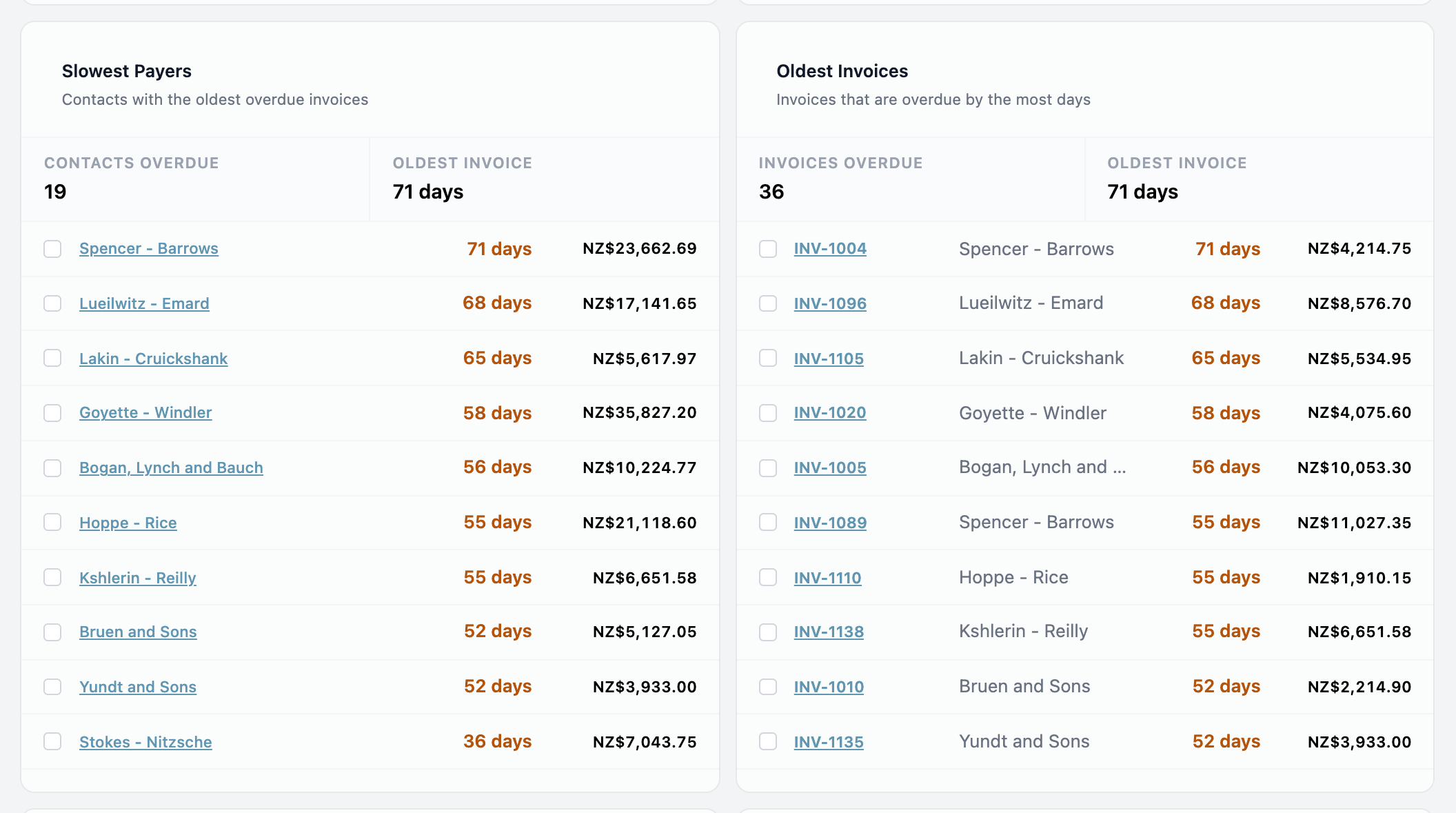
Slowest Payers lists the 10 contacts whose oldest overdue invoice is the most overdue. Each row shows the age of that invoice and the contact’s total overdue balance, converted to your base currency and net of unallocated credit. The strip at the top counts every contact with something overdue and shows the age of the oldest invoice.
Tick contacts to act on them together: Send statements or Charge interest. These open the same dialogs as the bulk actions on the Contacts page. See Bulk actions and announcements.
Oldest Invoices lists the 10 Approved invoices that are most overdue, with the contact, days overdue and the amount still due in the invoice’s own currency. Hover over the days to see the due date. Tick invoices to Email them a reminder or Issue late fees.
Other panels
- Upcoming Actions: drafts waiting for approval and actions scheduled to run. See Work with the Actions page.
- Invoice History: invoices due each month, split into Paid, Paid late, Overdue and Outstanding.
- Email Delivery: your delivery rate over the last 90 days and the addresses that recently bounced.
- Expected Payments: unpaid invoices by the date Paidnice expects them to be paid, based on the due date and the customer’s average days to pay. Switch to Due to group them by due date instead.
For figures you can filter, save and export, use the Reports page. See Exports, reports and email performance.